


NG Project Basic Credit Guide
Created mainly to put the previous post out of my mind, to raise user awareness, and because I'm bored.
The project page is where you manage all the settings for your Newgrounds projects, whether they're on the art, audio, games, or movies portals. If you're new to the site or don't browse much, you might find the interface or some settings confusing, especially when giving credit.
General note: It's a universal rule that you must be the creator of your project; you can't publish something you didn't create, even with credits or the original author's consent. In any case, only the creator can publish it on their NG account. Principal exceptions to this occur with copyright-free material for movie or game projects, but the main material must be yours.
Important note: This is based on Vinity's own experience. the information is subject to change or editing. This small blog aims to raise awareness about basic credits, not project rules or guidelines.
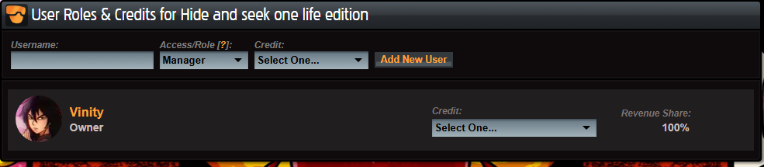
Highlighting Native NG Credits
Newgrounds credits should be easy to understand from the start. Among the listings for people credited on a work, who will be shown on the published project page:
Username
-The user who will be credited (requires a Newgrounds account). Enter the username to be credited.
Access/Role
-the most important part and the one that many people get confused about.
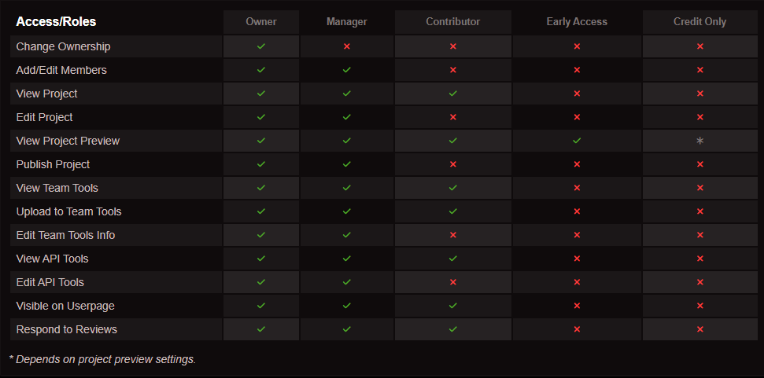
While it provides all the information for each role, many people misunderstand it, which can have negative consequences. Apart from the fact that these change slightly between a published and an unpublished project, pay attention.
Summary of each role + example:
Credit only/early access: These are essentially the same, except that "credit only" depends on the display settings. When the project is published, "credit only" changes to "no access". This option is used to credit someone as a gift or inspiration, even if they haven't actually contributed to the project. Please avoid giving contributor or manager roles to someone you're simply giving a gift to.
Contributor: The default option for collaborations or group projects where everyone contributed. Use it whenever someone has done something significant beyond simply existing. Keep in mind that users with this role will receive project notifications and can respond to reviews, which isn't ideal if you simply wanted to give them a gift. Seriously, it's annoying.
Manager/Owner: These roles can edit the entire project, including who is involved and settings. The only difference is that the Owner can change the Manager's role and delete/unpublish a project. Managers are essentially users who manage contributors and other roles, acting as assistants to the Owner. Again, if you're going to give a gift, don't use the manager role for the credited user, not only because of the notifications they'll receive, but also because they can unpublish and change the entire project. without you knowing. :)
Note: Credits have a hierarchy; depending on the one the user selects, the user will appear higher on the display page, and all users will be arranged in alphabetical order.
Credits
Don't confuse it with the role; the credit is essentially a title that highlights what you're crediting the user for. By default, you'll find it under author/artist. Don't worry if you don't find the artist or author credit because it will only become visible when you publish the project, again, as the default. Depending on the project, the types of credits you find will vary.
Extra credits
Since Newgrounds is a place that respects the work done by each individual, it's normal that it requires highlighting credits and inspiration for external/native factors, although it's not always necessary, sometimes it's mandatory.
If you use material or inspiration from the portal, highlight it under the following cases:
Audio
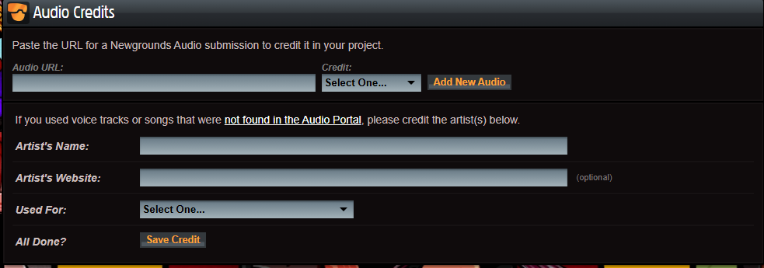
in case it comes from the portal, put the audio URL from the Newgrounds portal; no extra credit is required for the artist account, as a link is already provided. Otherwise, fill in the remaining fields. Remember that you must have a license to use the content; if you have any questions, contact an audio moderator.
Images
The use of material that must be solely yours has already been discussed; however, there are various cases where it's possible to use some images, such as collages, templates, stamps, references, even if you used someone else's character (which you drew, but the author doesn't have a NG account). In any case, you can leave a link in the description to the person, reference site, or asset with a free license. Keep in mind that most of the visible work is yours. It's usually quite arbitrary and acceptable (for example, drawing a character and placing the reference image next to it), but you can ask an art moderator if needed. For low-quality material, uncheck the "this is not a sketch" box.
Using a description is quite vital when giving external credits, remember that, especially when a moderator is managing your project.
Products and equipment

The subject speaks for itself. Highlight the materials and tools used for your project, whether it's your software, brushes, instruments, tablet, computer, etc. Regardless of whether they're digital or not, this option is mostly a matter of preference, but some may find it interesting. You can include these in the detailed description, and even links, but be careful. This option is primarily for you to explore on your own, so don't include misleading or malicious links.
This is all the basics; I made the post mainly cuz access roles, almost everyone dont know abot em. I may add examples, or I may not. Follow Vinity to reach 600, I would already have 600 if I hadn't lost like 70 fans but oh well, that's life.


This is a really good guide! I'm gonna use this, so thanks for making it!
I doubt you need it, given that it's for noobs, but thanks 🫠